By UpsideGPT Trading Desk · October 4, 2026 · 16 min read
5 Best Tradvio Alternatives in 2026 (Free & Paid)
Disclosure: We make UpsideGPT, one of the tools compared here, and our in-house UpsideGPT Trading Desk wrote this guide. None of the companies compared here owns any part of UpsideGPT, partners with us or pays us, and this article contains no affiliate links. We compared the other tools on their public pages and pricing, and Tradvio also on its terms and user reviews, as of October 3, 2026. We describe UpsideGPT from our own product specs and our desk's internal trading records. We did not test competitors hands-on. This is educational content, not financial advice: trading involves risk of loss, and AI analysis can be wrong.
Tradvio turns a chart screenshot into a buy or sell call with entry, stop-loss and take-profit levels. Many traders like it; others leave over billing or support, or want more context than one chart shows. Here are five Tradvio alternatives and apps like Tradvio, compared on price, features and free plans as of October 3, 2026.
Searching for "TradeVio"? Same product: Tradvio, at tradvio.com.
Quick picks
- Every timeframe, the economic calendar, live macro, news and stock fundamentals from one TradingView screenshot: UpsideGPT (ours). $40/month or $180 one-time.
- Best free option: Chart AI (AI Nation). 2 analyses at signup, then 1 a day.
- Best for stocks on a budget: ChartGuru. Free plan, then $25/month.
- Best for forex and gold: ChartJudge. From $29.99/month.
- Best if you already pay for an AI assistant: ChatGPT, Claude or Gemini. You write the prompt.
Why traders look for a Tradvio alternative
Tradvio pricing and features (October 2026)
| Tradvio | |
|---|---|
| What it does | Buy/sell signal, confidence score, entry, stop-loss, take-profit and risk:reward from a screenshot, for scalp, swing or spot trading (tradvio.com, features) |
| Web pricing | Starter $20/month or $100/year. Pro $100/month or $700/year (tradvio.com) |
| Mobile apps | iOS in-app purchases: $19.99 and $99.99. iOS and Android descriptions: $9.99/month or $99.99/year (App Store, Google Play) |
| Free plan or trial | None listed in the pricing section (tradvio.com) |
| Markets | Not listed on the website. App listings name crypto, stocks and forex (App Store); the Pro simulator uses futures prices (tradvio.com) |
| Who runs it | The terms name no company (terms). The iOS seller is Apex AI Labs (App Store) |
| Ratings | Trustpilot 3.3, 56 reviews (Trustpilot). US App Store 4.8, 97 ratings (App Store). Google Play 4.8, 628 reviews (Google Play) |
Starter includes unlimited analysis, a Signal Hub and an Economic Calendar. Pro adds a paper-trading simulator, AI coach, advanced journal, heatmaps and broker connections (tradvio.com).
What 68 public reviews say (as of October 3, 2026)
We read all 56 Trustpilot reviews and the 12 written US App Store reviews. On Trustpilot, 57% are five stars and 36% one star, all unverified (Trustpilot); all 12 App Store reviews are five stars (App Store feed). One review can count toward several themes.
| Complaint | Reviews | What the reviewer says (unverified) |
|---|---|---|
| Support doesn't reply | 11 | Says support never answered, in a 4-star review (Feb 2026) |
| Wrong calls or made-up analysis | 10 | Says the report was "hallucinating" (Apr 2026) |
| Charged after canceling, or unrecognized charges | 7 | Say charges or charge attempts continued after canceling (Jun 2026, Jun 2026) |
The praise is real too. Seventeen reviewers say they made money or traded better, self-reported (example); eleven say it helped them as beginners (example), and five describe it as a second opinion (example).
Tradvio alternatives compared (as of October 3, 2026)
| Tool | Best for | Markets | Input | Lowest monthly plan* |
|---|---|---|---|---|
| Tradvio (reference) | Signals, plus Pro simulator and broker sync | Crypto, stocks, forex; futures in simulator | Screenshot | $20/mo (web; app listings describe $9.99/mo) |
| UpsideGPT (ours) | Timeframes, calendar, macro, news and stock fundamentals in one read‡ | Forex, stocks, crypto, commodities, indices‡ | One TradingView screenshot‡ | $40/mo ($180 one-time) |
| Chart AI | Free daily read, ICT/SMC | Forex, crypto, indices, commodities, stocks, futures | Any chart image | $12.99/mo |
| ChartGuru | Stocks on a budget | Crypto, stocks, forex, commodities, gold and silver | Screenshot or symbol | $25/mo |
| ChartJudge | Forex and gold with event risk | 28 forex pairs and gold (others image-only) | 1 to 3 screenshots | $29.99/mo |
| ChatGPT, Claude, Gemini | DIY with your own prompts | Any (general-purpose) | Image plus prompt | $4.99/mo (Google AI Plus) |
How we researched this
Our desk wants six questions answered before risking money:
- Multi-timeframe confluence, ideally from one upload.
- Complete trade plan: entry, stop, targets and risk:reward, ideally with an invalidation level.
- Event risk: upcoming economic-calendar events.
- Macro and news inside the plan, not on a separate page.
- Stock fundamentals: valuation, earnings, analyst targets.
- Bull and bear scenarios with probabilities.
We built UpsideGPT around these questions, so it scores well here by design. Weigh them against your own needs.
This is a short list, not a full market survey: AI chart analysis tools with public prices (ours, plus three picked for different needs) and the general AI assistants many traders already pay for. Other screenshot tools exist, and the 5-chart test below works on any of them. "Not documented" means we couldn't find it on public pages, not that the tool lacks it. Our tool is listed first because we make it, not as a ranking.
Run your own 5-chart test. Don't take anyone's word on accuracy, ours included. Run five charts you've already traded through each tool, outcome hidden. Check that every level is on your chart, that there's a stop, and whether scheduled news gets flagged. Five charts prove nothing statistically, but they expose made-up levels.
1. UpsideGPT (ours): every timeframe, the calendar, macro and news from one screenshot
What it does
Upload one TradingView chart screenshot and UpsideGPT builds a complete trade plan in 30 seconds or less. It covers forex, stocks, crypto, commodities and indices.
How UpsideGPT reads one chart, step by step
- Your timeframe. A technical read of the chart you uploaded, on the timeframe you trade.
- Every other timeframe of the same asset, cross-checked against yours. It's the top-down pass most of us do by hand: a 15-minute long means less when the daily is rolling over.
- The economic calendar. Every release scheduled for the day, the week and the month, with each release's history and how the market reacted to past releases. If CPI is out tomorrow, you want to know how this market moved on the last few prints before you set a stop.
- Live macro and geopolitical events, and their impact on the market. A central-bank surprise or a conflict headline can reprice a market in minutes.
- Recent news. A single headline can make a clean pattern irrelevant.
- Fundamentals, for stocks: P/E, EPS, ROE, debt-to-equity, analyst price targets and upcoming earnings dates. Holding a swing trade through an earnings report? That date belongs in the plan.
- Our desk's strategy. Every input above runs through the strategy our desk trades.
What you get in each read
- A bias and a buy, sell or wait call
- Entry, stop-loss, TP1 and TP2
- Risk:reward on the trade
- A confidence score
- Bull and bear scenarios, each with a probability
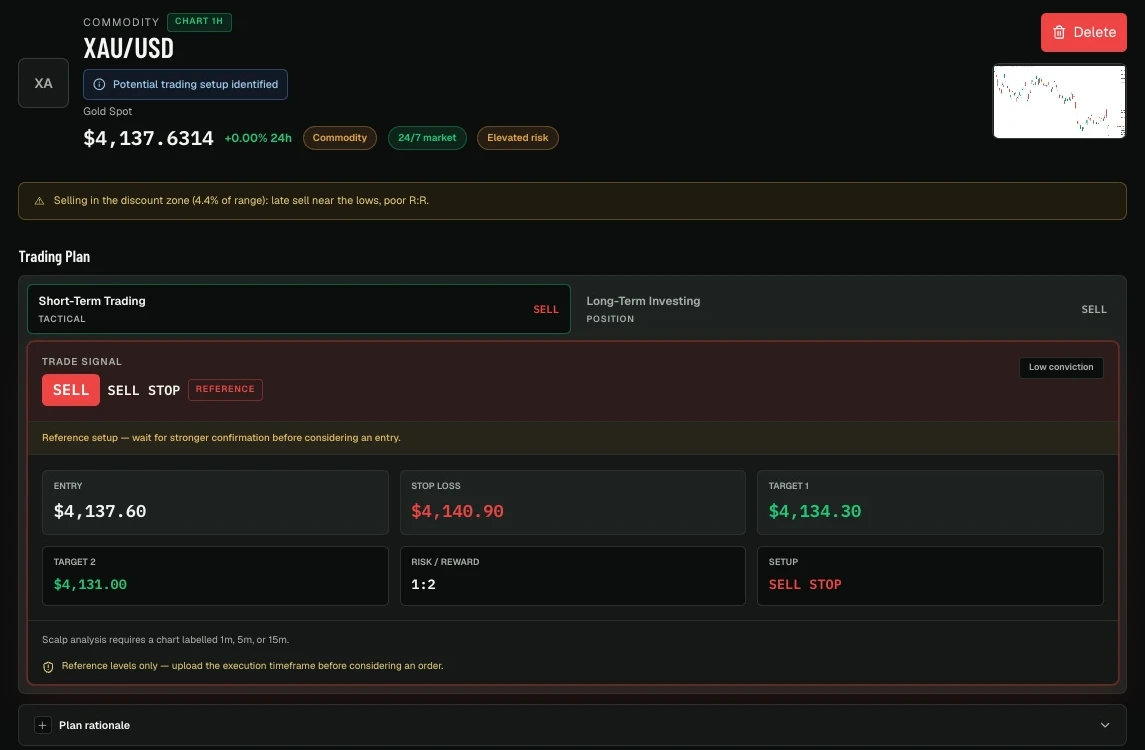
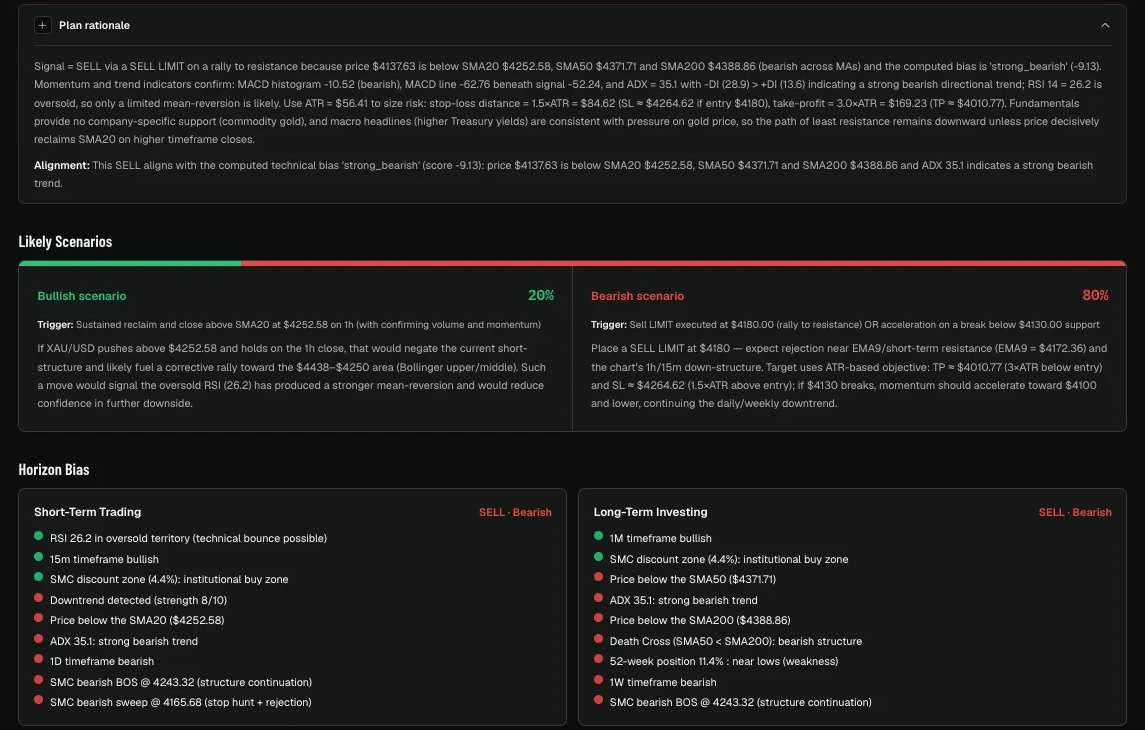
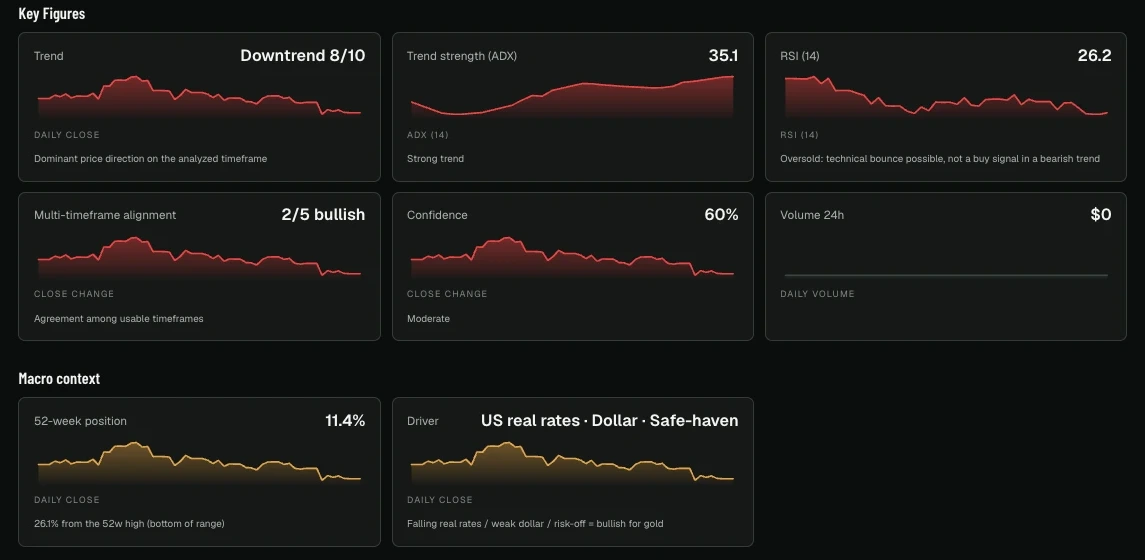
The confidence score and the scenario probabilities are the analysis's own estimates for that chart, not a probability of profit. Two targets let you plan a partial exit instead of closing everything at once. And "wait" is a real answer: not every chart is a trade.
Built around how you trade
- Onboarding questionnaire. A few questions when you sign up adapt the reads to your trading profile.
- Unlimited analyses. Re-check a chart before and after a release, or run your whole watchlist, without counting credits.
- Trading journal. A built-in journal to log and track the trades you take, in the same tool you plan them with.
- Telegram support. Support and answers to your questions from a member of our desk on Telegram, included on both the monthly and Lifetime plans.
Who's behind it
The UpsideGPT Trading Desk is three full-time, US-based traders who have traded multi-asset markets since 2018. The desk's record below starts in August 2021, nearly five years before UpsideGPT launched in June 2026, and covers trades the desk placed itself.
Our desk's own trading record (not user results). According to our trading desk's internal records, the strategy behind UpsideGPT has been traded live since August 2021 across several thousand multi-asset trades, with an 85% win rate and an average realized reward-to-risk of about 2:1 at final close. These are the desk's own results, not a third-party-verified track record and not the results individual UpsideGPT users should expect. Past performance does not guarantee future results. This figure describes trades our desk placed, not the accuracy of UpsideGPT's analyses, and it can't be compared with any other tool in this guide.
Who it's for
- You trade several markets and want one tool for all of them.
- Scheduled news has stopped you out before, and you want the calendar and its history inside the plan, not in another tab.
- You trade stocks and want valuation, earnings dates and analyst targets next to your entry and stop.
Who should pick something else
- Budget comes first. Chart AI's monthly plan is $12.99 and ChartGuru Starter is $25/month.
- You trade only forex pairs and gold and prefer a tool built just for them: ChartJudge.
- You chart on Thinkorswim, Webull or MT4: ChartGuru documents support for those screenshots.
Limitations
- Price. $40/month is twice Tradvio Starter and more than the cheapest paid plan of every other tool here.
- It doesn't place trades for you. You execute and manage every position yourself.
- TradingView input. It's built for TradingView chart screenshots.
- Fundamentals cover stocks only. Reads on forex, crypto, commodities and indices have little or no fundamental data.
- It's new. It launched in June 2026 and has more than 1,000 users as of October 3, 2026, but we found no Trustpilot page or other independent reviews of it.
Pricing (Oct. 3, 2026)
$40/month, or $180 one-time for the Lifetime plan. Both plans include unlimited analyses, the trading journal and Telegram support from a member of our desk.
UpsideGPT vs Tradvio
Both turn a screenshot into a buy or sell call with entry, stop, take-profit, risk:reward and a confidence score. Tradvio costs less per month (Starter is $20 and includes an Economic Calendar), and Tradvio Pro offers a paper-trading simulator and broker sync. UpsideGPT ($40/month) builds every timeframe, the calendar with past market reactions, live macro and news, and stock fundamentals into the plan itself. If unanswered support is why you're leaving Tradvio (the most common complaint in the reviews we read), both UpsideGPT plans include support from a member of our desk on Telegram.
2. Chart AI (AI Nation): best free option
What it does: Upload a screenshot or any chart image (PNG or JPG up to 10 MB), or capture one on its Charts page, for an entry zone, stop-loss, three targets, a favorability score and a "reverse scenario" showing what invalidates the view (autochart.trade). Reads forex, crypto, indices, commodities, stocks and futures.
Highlights
- Tuned for ICT and Smart Money Concepts: liquidity, structure, order blocks.
- 20+ languages, follow-up chat and a daily free tier.
- Its FAQ is upfront that "the confidence score is a guide, not a probability of profit" (pricing).
Limitations
- Multi-timeframe, news, economic calendar and fundamentals not documented. Paid plans list "Multi-image charts" (up to 2 or 4); public pages don't say how they're used.
- Risk:reward isn't on its homepage; its blog says each plan shows the implied R:R from entry to TP3 (blog).
- Web and mobile apps are separate subscriptions (pricing).
Pricing (Oct. 3, 2026): Free (2 at signup, then 1/day, no card). Paid plans are $4.99/week, $12.99/month or $79.99/year, per the offer data on its pricing page (pricing).
Our take: The reverse scenario is the part we'd read first: knowing where an idea is wrong matters more than the third target.
Choose it over Tradvio if you want a free daily read or the lowest monthly plan among the dedicated chart-tool alternatives here ($12.99), or you trade ICT/SMC.
3. ChartGuru: best for stocks on a budget
What it does: Search a symbol or upload a screenshot from TradingView, Thinkorswim, Webull or MT4 for a live analysis (screenshot tool). Covers crypto, stocks, forex, commodities, gold and silver.
Highlights
- Reads the symbol and timeframe from your screenshot, then gives entry, a stop that doubles as invalidation, a target, a calculated risk:reward and a confidence score (screenshot tool, FAQ).
- Separate fundamental analyses on earnings trends, valuation multiples and balance sheets (stock research).
- "Guru" reports "combine technical structure, fundamentals, and news into a rated brief" (FAQ).
- States that it doesn't publish win rates or promise accuracy (chartguru.io).
Limitations
- Multi-timeframe bias notes start at the $49 Trader plan (watchlist). No probability scenarios documented.
- Analyst price targets not documented.
- The free plan is capped and shows ads (pricing).
Pricing (Oct. 3, 2026): Free (10 analyses in your first 30 days, then 5 a month, no card). Passes from $0.99/day (auto-renews daily). Starter $25/month or $240/year, Trader $49/month, Professional $75/month (pricing).
Our take: For stock traders, a chart read and an earnings-and-valuation check in one place cover much of a pre-trade routine.
Choose it over Tradvio if you trade stocks and want earnings and valuation context, or a free plan with no card.
4. ChartJudge (Forex Sentiment): best for forex and gold
What it does: Paste a screenshot, confirm the symbol, and get a trade idea or setups to wait for, with tracking and email alerts on paid plans (ChartJudge). It takes PNG, JPG or WebP screenshots up to 8 MB from TradingView, MetaTrader, cTrader or a broker app.
Highlights
- Economic calendar built in: "event risk is written into the plan, not discovered afterwards".
- Levels computed from real quote data, plus retail positioning and currency strength.
- Entry, stop, two targets, risk:reward, and bull and bear scenarios with invalidation.
- Pro adds CSV and JSON export (pricing).
Limitations
- Full data only on 28 forex pairs and gold. Other markets get an image-only read at reduced confidence.
- Multi-timeframe needs the Plus plan ($49.99) or higher and 2 or 3 screenshots (pricing).
- Per-scenario probabilities and stock fundamentals not documented.
Pricing (Oct. 3, 2026): 10 free credits once, no card (enough for 5 standard analyses). Starter $29.99/month, Plus $49.99/month, Pro $99.99/month, with annual options (pricing).
Our take: Computing levels from quote data instead of reading them off the image targets a complaint we saw in Tradvio's reviews: wrong or made-up levels. We haven't tested how well it works.
Choose it over Tradvio if you trade forex or gold and news releases keep catching you off guard.
5. ChatGPT, Claude or Gemini: the general-purpose route
What it does: Upload a chart image and ask your own questions.
Highlights
- Free tiers on all three, and you may already pay for one.
- Any market, any question, with follow-ups and web search when you ask.
- Gemini takes up to 10 files per prompt, so you can upload several timeframes at once (Gemini help). Claude accepts JPEG, PNG, GIF and WebP images (Claude help).
Limitations
- No trade-plan format: results depend on your prompt.
- No documented calendar, fundamentals or multi-timeframe workflow for charts. You must check every price level.
- Free tiers cap uploads (ChatGPT Free lists limited file uploads and vision), and limits change over time (ChatGPT pricing).
Pricing (Oct. 3, 2026): Free tiers. ChatGPT Plus $20/month (OpenAI). Claude Pro $20/month (Claude). Google AI Pro $19.99/month, AI Plus $4.99/month (Google).
Our take: Ask for entry, stop, two targets, risk:reward and what invalidates the idea. Then ask it to list every price it read off your chart, and check each one.
Choose it over Tradvio if you'll write a structured prompt and verify the answer. Start with our guide on how to use AI for stock analysis.
Checklist matrix: what each tool documents
Yes = documented on public pages (UpsideGPT: see ‡). Partial = partly documented, or documented with limits (for multi-timeframe: several uploads or a higher plan). – = not documented as of October 3, 2026 (the tool may still have it). Trade plan = Yes when entry, stop, targets and risk:reward are all documented.
| Tool | Multi-timeframe | Trade plan | Event risk | Macro & news | Stock fundamentals | Scenarios with % |
|---|---|---|---|---|---|---|
| Tradvio (reference) | – | Yes | Partial (separate calendar) | – | – | – |
| UpsideGPT‡ | Yes (one upload) | Yes | Yes | Yes | Yes | Yes |
| Chart AI | – | Yes (R:R per its blog) | – | – | – | Partial |
| ChartGuru | Partial ($49+ plans) | Yes | Partial (earnings) | Partial | Partial | – |
| ChartJudge | Partial (2–3 uploads, Plus plan and up) | Yes | Yes | Partial | – | Partial |
| ChatGPT, Claude, Gemini | – | – | – | Partial (on request) | – | – |
Free Tradvio alternatives
Tradvio's pricing section lists no free plan or trial. As of October 3, 2026, these tools do:
- Chart AI: 2 analyses at signup, then 1 a day, no card.
- ChartGuru: 10 analyses in your first 30 days, then 5 a month, no card.
- ChartJudge: 10 credits once, no card.
- ChatGPT, Claude, Gemini: free tiers with limits.
Best Tradvio alternative by use case
- Crypto: Chart AI for a free daily read; UpsideGPT for macro, news and the calendar in the plan.
- Forex and gold: ChartJudge for event risk and levels from real quotes; UpsideGPT if you also trade other assets.
- Stocks: ChartGuru on a budget; UpsideGPT for fundamentals, analyst targets and earnings dates in the same read. Either way, read how to analyze a stock before buying.
Stick with Tradvio if…
- You use the Pro simulator: $50K to $150K of virtual capital, real-time futures prices and AI coaching on every trade (tradvio.com).
- You want the Strategy Builder (plain-English rules to Pine Script) or Pro's broker sync, journal and heatmaps.
- $20/month fits your budget and Starter's unlimited analysis covers you.
- You prefer Tradvio's iOS or Android app, and billing and support have worked for you.
If you leave, cancel before your renewal date (terms, section 5) and keep a confirmation; app subscribers cancel in App Store or Google Play settings.
The honest limits of AI chart analysis
Every tool here, ours included, starts from a picture of past prices. An April 2026 study asked general AI vision models, including versions of Claude, Gemini and GPT, to predict 30-day price direction from candlestick charts. The best results were 53.48% on Chinese (HS300) stocks and 51.37% on the S&P 500, barely better than a coin flip (arXiv). It tested general models, not the dedicated chart tools on this list (including ours), and it didn't test whether adding news or macro data helps.
How our desk uses any AI read:
- As a second opinion, after you learn support and resistance, candlestick patterns and how to read a stock chart.
- Check every level against your live chart.
- Win rate means nothing without risk:reward. Win 70% of trades risking $1 to make $0.30, and you still lose. No past win rate, including our desk's, predicts your own results.
- Distrust headline numbers (win rates, user counts, ratings, profit screenshots) from any tool, including the figures we quote for our own desk and product in this guide.
Frequently asked questions
What is the best Tradvio alternative?+
It depends on what you trade. We built UpsideGPT ($40/month) to put every timeframe, the economic calendar, live macro, news and stock fundamentals into one plan from a TradingView screenshot. ChartJudge suits forex and gold, ChartGuru suits stocks on a budget, Chart AI has a free daily read, and ChatGPT, Claude or Gemini work if you write your own prompts.
Is Tradvio free? How much does it cost?+
Tradvio's website lists no free plan or trial in its pricing section as of October 3, 2026. On the web, Starter is $20/month or $100/year and Pro is $100/month or $700/year; app-store prices differ. Free alternatives include Chart AI, ChartGuru and ChartJudge.
Is Tradvio legit?+
Tradvio is a working product: the US App Store shows 4.8 from 97 ratings, and 57% of its 56 Trustpilot reviews are five stars. But 36% are one star, all 56 are unverified, and the top complaints are unanswered support, wrong or made-up analysis and charges after canceling.
Is Tradvio accurate?+
Tradvio's homepage shows "97% Satisfaction," a satisfaction figure, not a win rate. Reviewers' self-reported results run both ways: some report big win-rate gains (example), while a two-star reviewer was unhappy with scalping results at under 1:1 risk:reward (Jan 2026). We haven't tested any tool in this guide for accuracy, ours included, and no figure here compares one tool's accuracy with another's.
Does Tradvio trade for me or connect to my broker?+
Tradvio's Google Play listing says it does not place trades, but Pro advertises brokerage connections, portfolio sync and a trade manager with live P&L.
Can I just use ChatGPT instead of Tradvio?+
Yes, if you'll do the work. ChatGPT, Claude and Gemini accept chart images. None documents a built-in trade-plan format, calendar or fundamentals workflow for chart analysis, so use a structured prompt and check every level.
Sources
All pages accessed October 3, 2026.
Tradvio
- https://tradvio.com/
- https://tradvio.com/features
- https://tradvio.com/terms
- https://apps.apple.com/us/app/id6757087047
- https://itunes.apple.com/us/rss/customerreviews/id=6757087047/sortby=mostrecent/json
- https://play.google.com/store/apps/details?id=com.praidux.tradvio.ai&hl=en_US&gl=US
- https://www.trustpilot.com/review/tradvio.com?languages=all
- https://www.trustpilot.com/reviews/6998ce953ddd8f870b6de5b3
- https://www.trustpilot.com/reviews/69e85d33c035f71d33547b00
- https://www.trustpilot.com/reviews/6a35adf9e3ba0a36839f2a9b
- https://www.trustpilot.com/reviews/6a297cc875b16032375ccd8e
- https://www.trustpilot.com/reviews/6979788f3209f672e8fa56a2
- https://www.trustpilot.com/reviews/697c444669a148df26a76df5
- https://www.trustpilot.com/reviews/697964bc3ec18548acd44af7
- https://www.trustpilot.com/reviews/6977d894cb465b4db8bf95d3
UpsideGPT
- Our own product specs and our desk's internal trading records (not public)
- Product page: upsidegpt.com
Chart AI (AI Nation)
- https://autochart.trade
- https://autochart.trade/pricing/
- https://autochart.trade/blog/risk-reward-ratio-explained/
ChartGuru
- https://www.chartguru.io
- https://www.chartguru.io/analyze-screenshot
- https://www.chartguru.io/faq
- https://www.chartguru.io/ai-stock-market-research
- https://www.chartguru.io/pricing
ChartJudge (Forex Sentiment)
ChatGPT, Claude, Gemini
- https://help.openai.com/en/articles/6950777-what-is-chatgpt-plus
- https://chatgpt.com/pricing/
- https://claude.com/pricing
- https://support.claude.com/en/articles/8241126-upload-files-to-claude
- https://gemini.google/us/subscriptions/?hl=en
- https://support.google.com/gemini/answer/14903178?hl=en
Research
Not affiliated. Tradvio, Chart AI, AI Nation, ChartGuru, ChartJudge, Forex Sentiment, ChatGPT, Claude, Gemini, TradingView and the other product, company and service names mentioned here (including Trustpilot) are trademarks of their respective owners. UpsideGPT is not affiliated with, endorsed by or sponsored by any of them. Facts about other tools come from their public pages as of October 3, 2026 and may have changed. Report errors to hello@upsidegpt.com. We date every update.
Risk disclaimer. This is educational content, not financial advice. Trading forex, stocks, crypto, commodities and indices involves a substantial risk of loss, and leveraged products such as forex and CFDs can lose money quickly. AI chart analysis, including UpsideGPT's, can be wrong. The desk performance figures quoted in this guide come from our internal records, are not third-party-verified and are not the results UpsideGPT users should expect. Past performance does not guarantee future results. UpsideGPT provides general analysis and does not know your full financial situation. Telegram support from our desk covers using the product and answering your questions; it is not individual investment advice or personalized trade calls. Never trade money you can't afford to lose. UpsideGPT is operated by ITC ECOM LLC (Wyoming, USA).

UpsideGPT Trading Desk
Published October 4, 2026
Disclaimer: This article is for educational and informational purposes only and is not financial advice. Trading and investing carry significant risk of loss. Always do your own research. Past performance is not indicative of future results.